Morning Brief — 2-Minute Read
- The average solo attorney bills just 2.5 hours per day (Clio Legal Trends Report) — roughly 38% of a standard workday
- The rest goes to heavy solo attorney admin tasks like intake, follow-up, scheduling, billing, and client communication
- This is not a time management problem. It is a structural one.
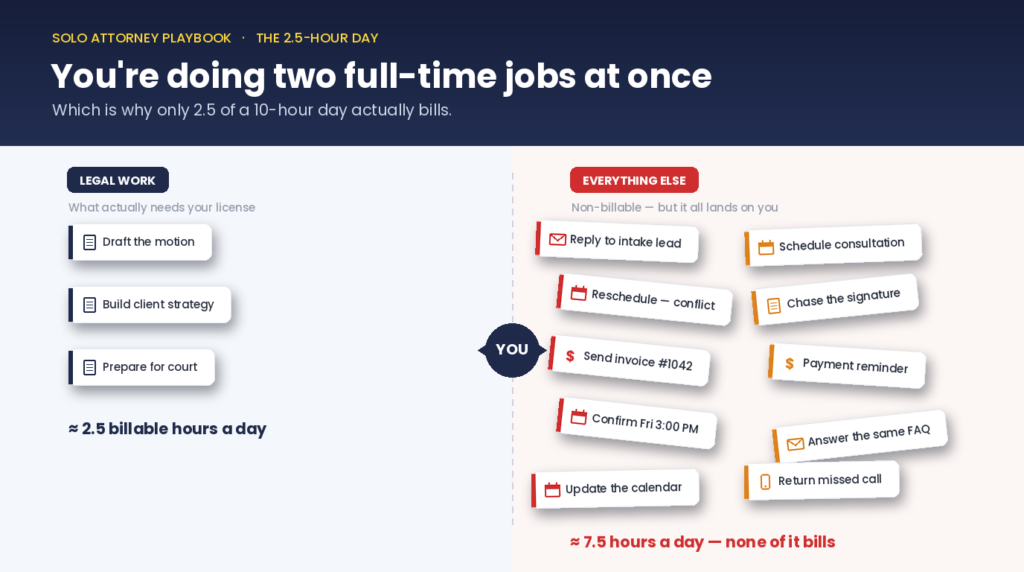
- Solo attorneys are running two full-time jobs with no support layer for either
- Practice management software organises work — it does not remove it
- The fix is an operations layer that handles routine tasks automatically
- Recovering 4 hours per week at $250/hour = $48,000/year in billing capacity
The Reality of Solo Attorney Admin Tasks: It’s 7 PM and You Billed 2.5 Hours
You finished every client matter that needed attention today.
You returned calls, handled two new leads, chased a signature, sent three invoices, updated your calendar twice.
It’s 7 PM. You billed 2.5 hours.
That’s not a bad day. That’s a typical one.
According to the Clio Legal Trends Report, the average attorney bills just 2.5 hours per day — roughly 38% of a standard workday.
The rest goes to:
- Intake and lead follow-up
- Scheduling and confirmations
- Client communication
- Billing and invoice chasing
These tasks keep the practice running. They generate nothing on their own.
Most solo attorneys assume they need better time management. They’re wrong.
The problem is structural. You’re doing two full-time jobs at once, and nothing in your setup is designed to change that.
The Reality of Solo Attorney Billable Hours
The Clio Legal Trends Report tracks this every year. The 2024 edition confirms the same pattern:
Average billable hours per day: 2.5
On a 10-hour day, that’s 25%.
The problem isn’t effort. It’s structure.
A Real Day, Minute by Minute
8:30 AM — You sit down
Before opening a case file, you check email.
A prospective client messaged last night. You read it, draft a reply, send it. 12 minutes.
Two existing clients emailed with questions. You reply to both. 18 minutes.
It’s 9 AM. You haven’t started legal work.
9:00 AM — You open the motion from yesterday
Forty minutes of drafting. Then your phone rings.
A referral lead. You take the call, qualify the matter, draft a follow-up, attach a booking link. 25 minutes.
You return to the motion.
11:15 AM — Calendar reminder fires
Consultation at 11:30. You close the draft, join the call.
It runs 45 minutes. You agree to send a fee agreement by end of day. 10 minutes summarising the call.
It’s 12:45 PM. You’ve billed 45 minutes.
1:30 PM — Back to the motion
90 minutes uninterrupted — your longest focused window of the day.
A client texts about a court date. Five minutes to check and reply.
You’ve lost the thread.
3:30 PM — Billing
Six time entries sitting in your head from the past two days.
You log them, generate two invoices, spot an unpaid invoice, draft a reminder. 40 minutes. None of it billable.
4:15 PM — The fee agreement
Pull a template, customise it, send it. 20 minutes. Not billable.
4:35 PM — Back to the motion
You work through to 6:30 PM. Two more billable hours.
Total: 2.5 hours billed. Ten hours worked.
What This Tells Us
That time wasn’t wasted. It wasn’t mismanaged.
It was spent on real work that simply isn’t legal work.
The American Bar Association notes that solo attorneys often have to wear both the lawyer and business-owner hats, managing legal work alongside firm operations and client development.
A solo attorney isn’t less productive than a large-firm associate.
A solo attorney is doing three times the job scope on the same hours.
Why This Happens: The Missing Operations Layer
Every functioning business has two distinct layers:
| Layer | What it includes |
| Client work | Research, drafting, negotiation, court |
| Operational work | Intake, scheduling, follow-up, billing, comms |
In any business with even a small team, these layers are separated.
In a solo practice, there is no separation.
You’re Doing Two Full-Time Jobs at Once
You switch from drafting a motion → to answering an intake email → to updating a billing record → and back again.
Every day. With no transition between them.
Context switching has a measurable cost. Research shows returning to deep work after a distraction takes an average of 23 minutes.
When you stop to answer a 4-minute admin email, you don’t just lose 4 minutes.
You lose the focused window around it.
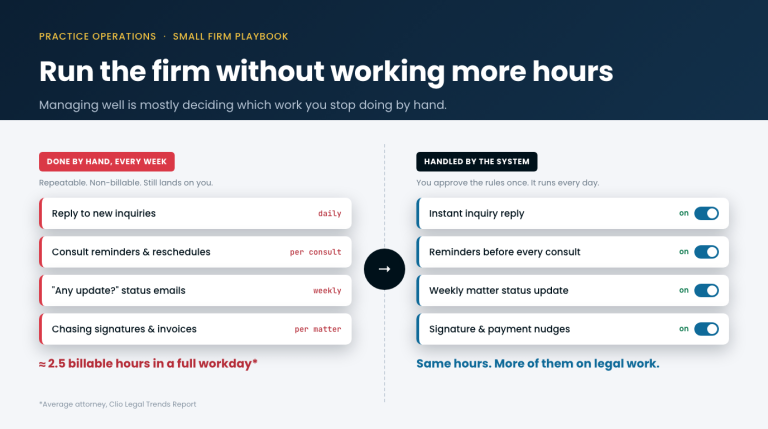
What It Looks Like With One Extra Person
A solo attorney with even a part-time administrator operates differently:
- New inquiry arrives → admin responds, captures info, sends booking link → attorney sees a confirmed consultation
- Document needs signing → admin sends follow-up → matter moves forward
- Invoice is due → admin tracks and sends → attorney never touches it
The legal work is identical. The difference is that operations has a dedicated owner.
Why Solo Attorneys Can’t Afford the Fix
A full-time administrator costs $45,000 to $60,000 per year.
For a practice billing 2.5 hours a day, that’s not viable.
So the attorney absorbs both roles. Billable hours stay low. The model stays broken.
Why It Doesn’t Feel Like a Role Problem
It feels like a time problem.
The instinct is to optimise the schedule — block time, reduce distractions, work faster.
But none of that changes the underlying structure.
You’re still the only person responsible for both producing legal work and running the business.
Until those responsibilities are separated, the ceiling on billable time stays fixed.
Why Legal Practice Management Software Doesn’t Fix It
Clio. MyCase. PracticePanther. These tools are useful.
They centralise case files, track deadlines, give you a dashboard view. (If you just need the arithmetic on a trigger date, our free court deadline calculator does that in the browser — you confirm every date.)
But they don’t solve the operations problem.
What a Tuesday Actually Looks Like
You log in at 8:45 AM. Four intake leads flagged for follow-up.
The platform logged them. You still have to open each one, read the inquiry, draft a response, and send it.
The platform knows the work exists. You’re still doing it.
By mid-morning, three tasks show overdue:
- Fee agreement not sent
- Document unsigned
- Invoice unpaid
The system flagged all three. It didn’t act on any of them.
By end of day, you cleared two of four. The platform worked as designed. Your admin load didn’t.
Organising Work vs. Removing Work
Organising work:
- You know what needs doing
- Nothing falls through the cracks
- You still do all of it
Removing work:
- Intake response went out without you
- Invoice reminder sent automatically
- Document follow-up triggered at 48 hours
- You never cleared a queue
Legal practice management software delivers the first.
Most solo attorneys need the second.
Built for Firms That Already Have Staff
The software industry built these tools for firms with staff — someone who looks at the dashboard and acts on it.
In a solo practice, that someone is always you.
You don’t have an organisation problem. You have a workload problem.
A cleaner system doesn’t reduce how much of that work lands on you.
What a Law Firm Operations Layer Actually Looks Like
An operations layer refers to concrete functions your practice needs to run — delivered by something other than you.
Here are the four functions where solo attorneys lose the most time.
Function 1: Client Intake
The scenario:
A lead submits a form at 2:15 PM Thursday. You’re in deposition prep.
The email sits until 5:30 PM. Back-and-forth scheduling follows. Consultation confirmed: Friday at 3 PM — 25+ hours later.
The competing firm replied in 10 minutes. They booked the slot at 2:25 PM.
Response time is not a minor variable. A 5-minute response converts at several times the rate of a 60-minute one.
Without a system:
Lead submits (2:15 PM) → Sits in inbox → You see it at 5:30 PM → Manual reply → Scheduling back-and-forth → Confirmed Friday 3 PM
25+ hours elapsed. Competing firm already won.
With an operations layer:
Lead submits (2:15 PM) → Automated response in 2 minutes → Info captured → Booking link delivered → Confirmed by 2:30 PM
You see a booked appointment when you surface from prep.
Function 2: Document Follow-Up
The scenario:
Fee agreement sent Monday. You’re in court Wednesday. You remember Friday. Five days later — client hired someone else.
Or: engagement letter sent Tuesday. First reminder drafted the following Monday. Matter sat idle for a week.
These aren’t failures of judgment. They’re failures of process.
Without a system:
Fee agreement sent → No response Wednesday → You remember Friday → Manual reminder → Client replies Monday
7 days lost. Matter stalled.
With an operations layer:
Fee agreement sent → Auto follow-up at 48h (Wednesday) → Second follow-up at 96h (Friday) → Notification when signed
Matter moves forward. You wrote nothing.
Function 3: Scheduling
The friction:
Lead contacts you → You propose times → They conflict → You propose alternatives → They accept → You send invite → They confirm
Six messages. Two days. Zero billable output.
At 15 new inquiries/month: potentially 90 messages and 3–4 hours/week of scheduling friction.
Without a system:
6 messages. 2 days. 0 billable minutes.
With an operations layer:
Lead contacts you → Auto-response with booking link → Lead selects slot → Auto-confirmation sent → Reminder sent 24h before
1 click. Minutes. 0 back-and-forth.
Function 4: Billing and Invoice Follow-Up
The scenario:
Work completed Monday. Invoice sent 9 days later — from memory, likely under-billed.
Sits unpaid 2 weeks. You notice Friday. You draft a reminder.
Full cycle: 24 days. Hours of manual effort.
Without a system:
Work done → Invoice 9 days later → Unpaid 2 weeks → Manual reminder → Payment received
24-day cycle. Under-billed. Hours wasted.
With an operations layer:
Work done → Invoice sent automatically → Day 14: auto-reminder → Day 21: second reminder → Day 30: flagged for you
You intervene only when genuinely needed.
LegalContext: The Operations Layer Built for Solo Practices
LegalContext is the system that handles these functions automatically — so you handle only the work that requires a license.
It operates across three core features.
Feature 1: Morning Digest
Pain point:
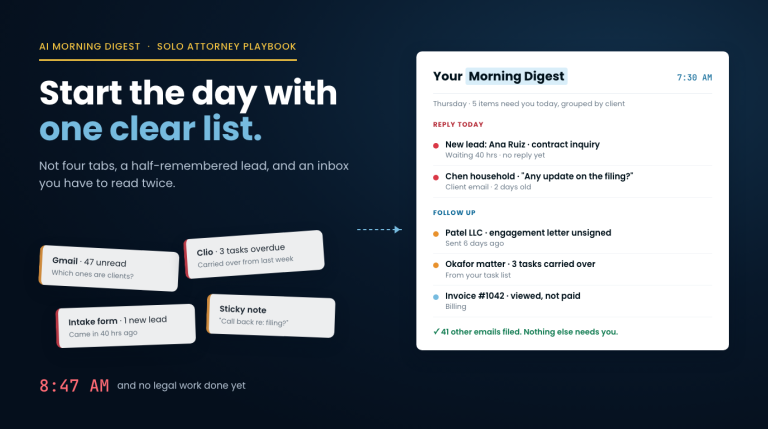
Every morning, attorneys spend 30–60 minutes reconstructing what needs attention across email, Clio, task lists, and memory. That reconstruction burns the highest-focus window before a single legal task begins.
How it works:
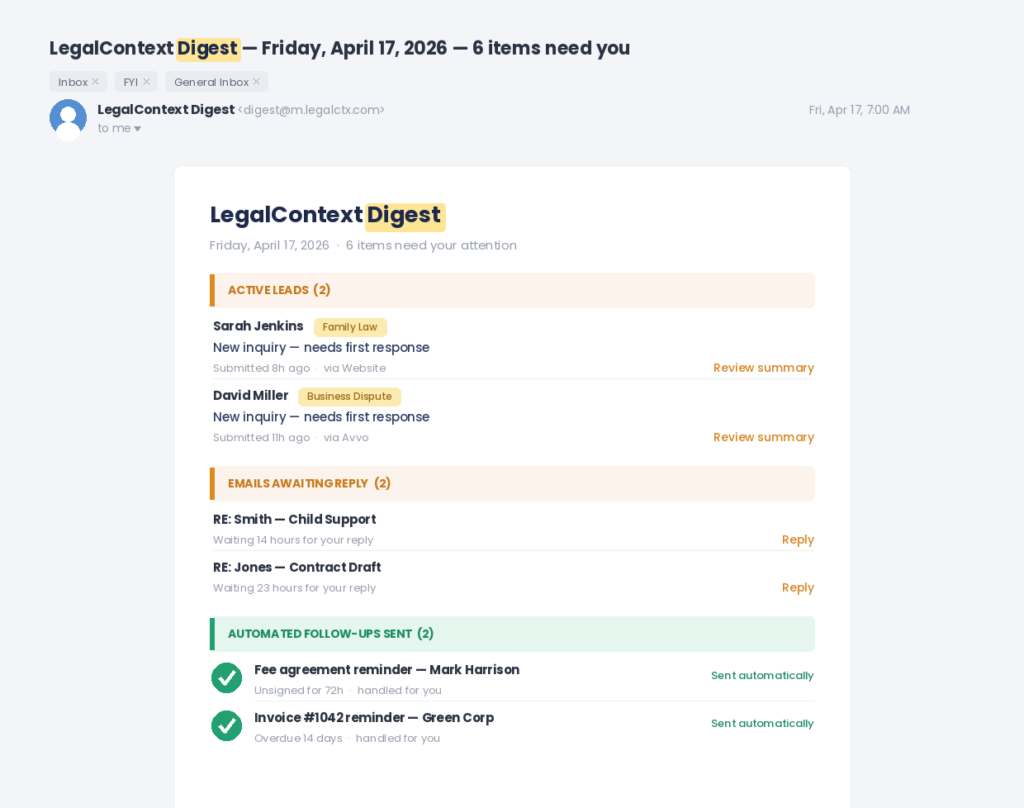
Before you open any tool, one email arrives.
The Morning Digest pulls every pending item across your practice:
- Leads waiting for a response (sorted by time elapsed)
- Client emails awaiting reply (flagged by wait time + matter)
- Follow-ups due today (including auto-generated items)
- Consultations and deadlines for the day
You read one email. You know what requires attention first.
No logging in. No tab switching. No reconstruction.
Leads that came in overnight surface at the top. Emails waiting 48 hours are flagged before you open your inbox. Auto-generated follow-ups (unsigned engagement letter at 72h, invoice at 14 days) appear without you creating them.
The digest replaces the first hour of every morning.
Feature 2: Intake Screening
Pain point:
When a new lead arrives, the attorney is almost never available to respond immediately. They’re in court, hearings, or a consultation. The lead sits. Every hour of delay compounds the disadvantage — the firm that responds first captures the engagement.
How it works:
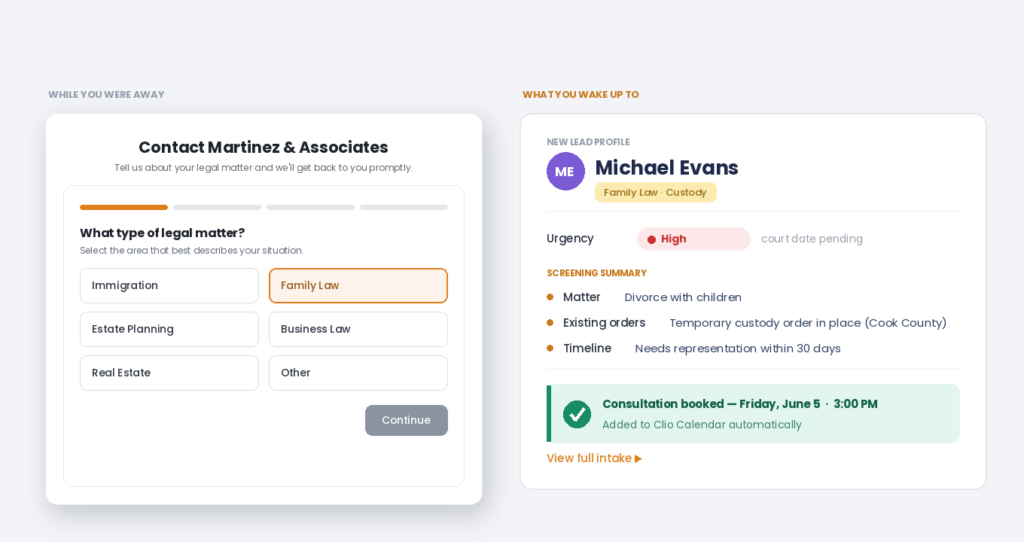
When a lead submits an intake form, LegalContext responds within minutes.
Not with a generic acknowledgment — with a structured screening conversation built around your practice area:
- Family law: type of matter, children involved, existing court orders, timeline
- Immigration: visa type, current status, filing deadlines
- Estate planning: asset complexity, family structure, urgency
By the time you’re available, the lead has been engaged, their information collected, and a consultation booked on your calendar.
You see a qualified, structured lead summary — not a raw inquiry still needing a response.
The intake process ran without your attention. Nothing fell through.
Feature 3: Dormant Client Follow-Up
Pain point:
A matter closes. The attorney moves to the next case. The client — satisfied, trusting, with ongoing legal needs — hears nothing. Months later, they need help with a contract dispute, an estate update, an employment issue. They search Google and hire someone else.
The revenue was there. The relationship was there. Nothing flagged it.
How it works:
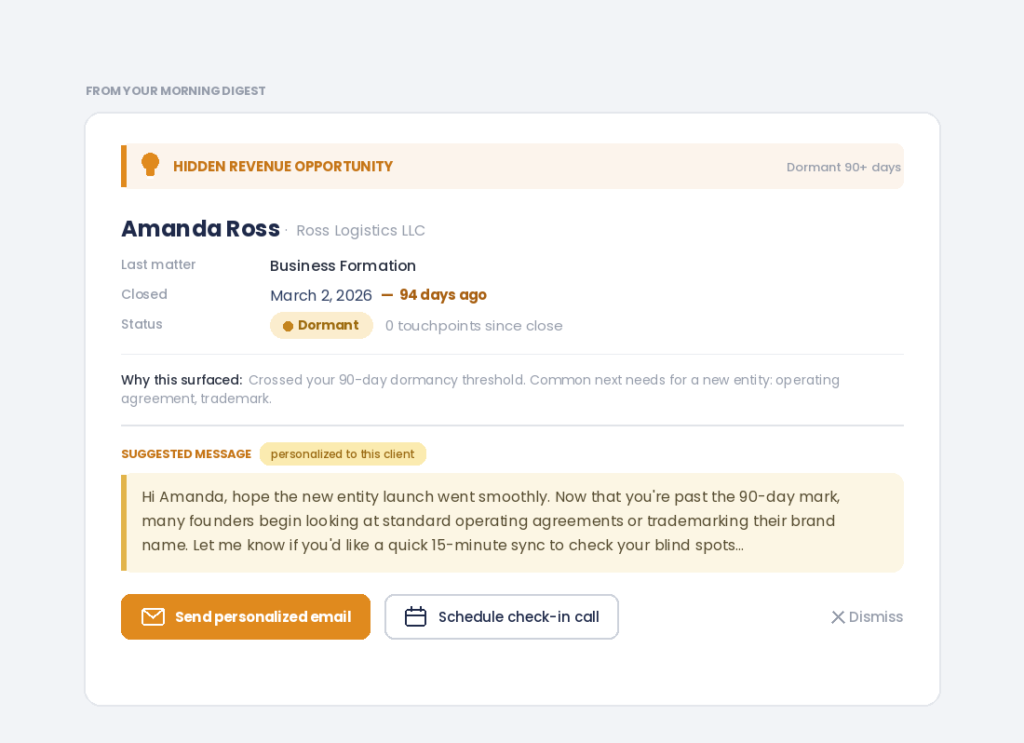
LegalContext monitors matter activity and flags contacts that have gone dormant based on configurable thresholds:
- Matter closed 90 days ago with no subsequent contact → re-engagement opportunity surfaced
- Lead screened but never converted after 30 days → follow-up sequence triggered
- Former client with an employment agreement → check-in prompt when conditions change
These alerts appear in the attorney’s morning digest with full context:
- Client name and last matter
- Date of last contact
- Suggested outreach prompt
The attorney sends a personalised message or schedules a call.
They didn’t need to remember the client existed. The system remembered for them.
Attorneys who implement dormant follow-up typically surface 2–4 re-engagement opportunities per month from contacts that would otherwise have remained inactive.
Three Features. One System.
| Feature | Problem it solves |
| Morning Digest | Fragmented morning reconstruction |
| Intake Screening | Missed leads during unavailability |
| Dormant Client Follow-Up | Revenue lost from cold relationships |
None require changing how you practice law.
None replace your existing case management platform.
They sit underneath your workflow and handle the functions that currently fall to you by default.
The Shift Solo Attorneys Need to Make
The most productive professionals aren’t the hardest workers.
They operate inside systems that absorb routine work on their behalf.
A large-firm attorney doesn’t answer intake calls. A partner doesn’t manage the billing cycle. People and platforms handle all of that.
The attorney shows up and practices law.
This holds across every licensed profession:
- Accountants don’t chase signed engagement letters — coordinators do
- Physicians don’t confirm appointments — the front desk does
Work that doesn’t require a license shouldn’t land on the person who holds one.
The Test
Take your last 10 working days. Write down every task completed.
Left column: Tasks requiring your legal knowledge, judgment, or client relationship.
Right column: Everything else.
Most attorneys find 50–70% of tasks land on the right:
- Confirming appointments
- Sending status updates
- Generating invoices
- Following up on unsigned documents
- Answering the same intake questions repeatedly
None of that needed you. It just needed to happen.
There’s a difference.
The Numbers
Intake, follow-up, scheduling, and billing account for 5–7 hours of admin work per week in a typical solo practice.
Conservative recoverable portion: 4 hours per week.
| Billing rate | Weekly recovery | Monthly | Annual |
| $250/hr | $1,000 | $4,000 | $48,000 |
| $350/hr | $1,400 | $5,600 | $67,200 |
Not from more clients. Not from longer hours.
From the same work — restructured so more of it bills.
The Fix Is Structural — Not Optional
You’re not behind because of poor time management.
You’re behind because one person is running a full legal practice and a full operations function simultaneously.
2.5 billable hours per day is not your ceiling.
It’s the ceiling for a practice where one person does every job.
Every year you absorb the operations role is another year of capped output. The admin scales with your caseload. More clients means more intake, more follow-up, more billing.
The work expands. Your hours don’t.
Running a practice where you handle every function is not a long-term model. The cognitive load accumulates. It narrows your capacity to do the legal work well.
The structural fix isn’t optional if you need the practice to last.
LegalContext gives solo attorneys the operations layer previously only available to firms with dedicated staff.
Intake. Follow-up. Scheduling. Billing. Dormant client re-engagement.
Handled automatically. No added headcount.
If you’ve finished a 10-hour day drowning in solo attorney admin tasks and still feel behind, this is where to start.
Try LegalContext — no credit card required.