The best immigration software, told straight
We're a consultancy for solo immigration firms, which means we have no reason to oversell any one tool. Here's an honest read on the main options, what each is genuinely good at, and who should pick what.
Most “best immigration software” lists are affiliate pages dressed as advice. This isn’t one. We’re Protomated, we help solo and small immigration firms fix their operations, and we get paid for the fix, not for steering you to a particular vendor. So we can be blunt.
There’s no single best immigration software. There’s the right tool for how your practice actually runs. A firm that mainly needs USCIS forms assembled has a different answer than a solo drowning in after-hours WhatsApp messages. Below is the honest version, what each tool is genuinely best at, and where it leaves a gap.
Short version: most of these are case management systems. The thing solo immigration firms most often lack isn’t case management, it’s the operations layer on top of it. Keep that distinction in mind as you read.
First, decide which problem you’re solving
Almost every bad software purchase we see in immigration practices comes from the same mistake: buying against a feature list instead of against a diagnosis. The feature lists all look similar, because these products genuinely do overlap. What separates them is which job they are built around.
There are three distinct jobs, and most firms need at least two of them covered:
1. Assembling and filing the forms. This is the work that is unique to immigration — G-28s, I-130s, I-485s, the whole USCIS surface. It is form-heavy, version-sensitive, and unforgiving of transcription errors. Tools built for this are immigration-specific by necessity; a general practice-management suite cannot do it well because the forms change and the logic is jurisdictional.
2. Running the matter. Storing documents, tracking where each case sits, calendaring, time and billing. This is what “case management” usually means, and it is the least differentiated of the three. Plenty of tools do it competently, including general-practice ones.
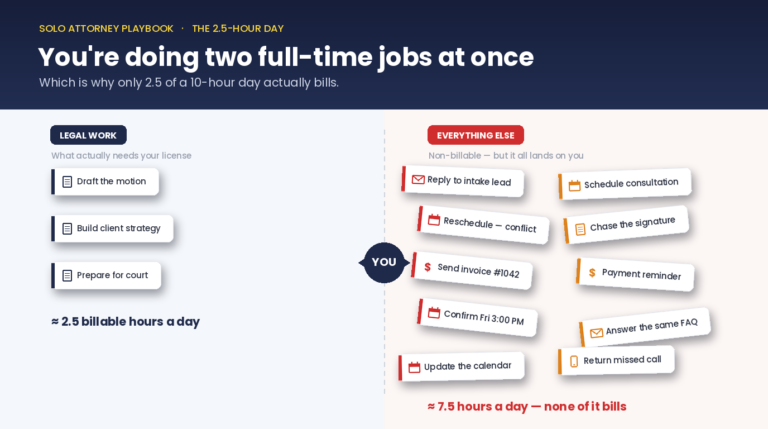
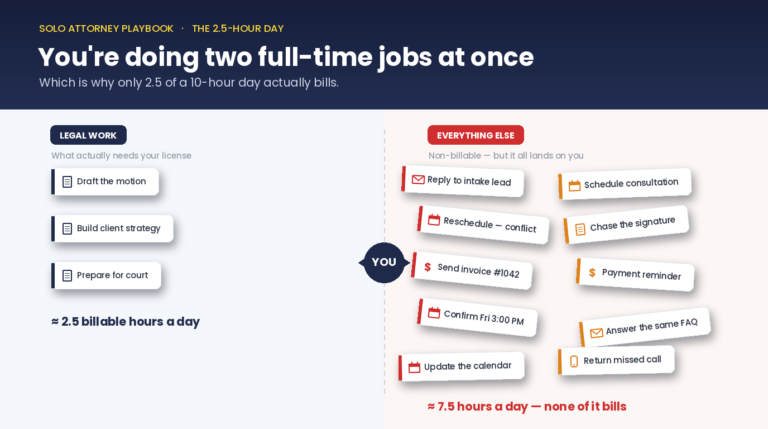
3. Running the work around the case. Capturing the lead who messaged at 9pm, screening whether they are worth a consult, following up with the client who went quiet, drafting the status update the client is about to chase you for. This is the operations layer, and it is the one most solo immigration firms have no system for at all.
Jobs 1 and 2 are usually bought together, in a single immigration case-management product. Job 3 is almost always left to memory, a notes app, and whoever is least busy. That is the gap this page keeps coming back to, because in the firms we work with it is the one costing the most money.
The tools, one by one
Docketwise — best for USCIS form assembly
If your core need is assembling and filing USCIS forms cleanly, Docketwise is our usual recommendation for solo and small immigration firms. It is immigration-native rather than a general suite with an immigration skin, and it shows in the details that matter day to day.
Its own pricing page lists smart forms, multilingual custom intakes and questionnaires, case and priority-date tracking, a client portal, document requests, and calendaring and time tracking on the entry tier, with e-filing, e-signatures, lead management, text messaging, a QuickBooks integration and an AI writing assistant on higher tiers. Pricing is per user, per month, across three tiers.
Two things worth knowing before you buy. First, it is priced per seat, so the cost scales with headcount — fine for a true solo, worth modelling if you are adding paralegals. Second, and more important: it is a case system. It will hold your matters and produce your forms, and it will not chase the lead who messaged you on WhatsApp at 9pm or notice that a client has gone quiet for six weeks. That is not a criticism, it is a category boundary. Expecting form software to run your intake is the mistake, not the software.
Lawmatics — best for marketing-driven firms with several seats
Lawmatics is a legal CRM and intake-and-marketing automation platform. It is genuinely capable at what it does: intake pipelines, automated follow-up sequences, appointment booking, custom forms, and the campaign tooling a firm needs if it is spending real money on client acquisition.
The constraint for our readership is structural rather than qualitative. Lawmatics’ own pricing page lists a three-user minimum on its Essential and Premium plans, rising to five on Enterprise. For a true solo — one attorney, no staff, or one attorney and a part-time paralegal — you are paying for seats you will not fill, and the marketing automation depth is aimed at a firm with a funnel to feed. If you run paid acquisition and have the seats, it earns its keep. If you are a solo whose intake problem is “messages arrive in four places and I answer them when I can,” it is a heavier and more expensive tool than the problem needs.
Cerenade / eImmigration — deep, established immigration filing
Cerenade (eImmigration) is one of the longest-established names in immigration practice software, and the depth reflects that. For firms with complex, high-volume filing workloads and established internal processes, that maturity is a real asset — it has seen more edge cases than newer entrants.
The trade-off is interface age. The product carries a lot of desktop-era design thinking, and firms coming from modern cloud tools tend to notice. Whether that matters depends on who is using it: a long-tenured paralegal who knows the system will be fast in it, while a new hire may take longer to get productive than they would in a newer interface. Judge it on a demo with the person who will actually live in it, not on screenshots.
Clio — best if immigration is one practice area among several
Clio is the broadest general-practice legal suite on the market, with the largest integration ecosystem and a mature product across matters, billing, payments and client communication. If your firm does immigration alongside family, criminal or business work, a single system across all of it has real operational value, and Clio is the strongest candidate for that job.
What it is not is immigration-specific. There is no native USCIS form assembly of the kind Docketwise is built around, so immigration-heavy firms typically end up pairing Clio with something else or working around the gap. Pricing is per user. For a pure immigration solo, you are buying breadth you will not use and still missing the forms layer. For a mixed practice, that calculus reverses.
LegalContext — the operations layer
LegalContext is what our team built, so read this section with that in mind. It is not a case-filing system and does not try to be one — it runs alongside whichever case system you already have.
It addresses job 3 above: capturing enquiries that arrive outside business hours and across channels, screening them before they reach your calendar, surfacing clients who have gone quiet, and drafting the routine client communication that otherwise sits on your to-do list. It is flat-priced rather than per seat, which is a deliberate choice for solos.
If your pain is form assembly, this is the wrong tool and Docketwise is the right one. We would rather tell you that than sell you the wrong thing.
Recommendations by firm size
The right answer changes more with headcount than with practice mix, mostly because per-seat pricing and staffing structure change what is affordable and what is necessary.
Solo attorney, no staff
One case system plus an operations layer. Docketwise for the forms, and something handling intake capture and follow-up. Avoid anything with a seat minimum — you will pay for empty chairs. The biggest risk at this size is not choosing the wrong case system; it is having no system at all for the work between cases, because there is nobody to absorb it when you are in a hearing.
Solo plus a paralegal or two
Same shape, but start modelling per-seat cost seriously, because it now multiplies. This is also the size at which handoffs start to fail silently: the attorney assumes the paralegal followed up, the paralegal assumes the attorney did. Shared visibility into what is outstanding matters more here than any individual feature.
Small firm, three to ten people
Seat minimums stop being a penalty and the marketing-automation tools start to make sense if you are actively acquiring clients. If immigration is your only practice area, an immigration-native case system remains the core. If you run mixed practice areas, a general suite like Clio with immigration tooling alongside is usually the cleaner architecture.
High-volume immigration practice
Filing throughput and data integrity dominate every other consideration. Depth of immigration-specific tooling, bulk handling, permission structures and migration support matter more than interface polish. Evaluate on your actual highest-volume case type with real matter data, not on a generic demo — the difference between tools shows up in volume, not in the sales call.
Features people ask about, answered honestly
Priority-date and receipt-number tracking. This is a genuine immigration-specific requirement and a reasonable thing to filter on. Docketwise lists case and priority-date tracking on its entry tier. General-practice suites typically do not have it natively, which is one of the clearest reasons immigration-heavy firms end up on immigration-specific software.
Multilingual intake forms. Directly relevant to most immigration practices and not a given across legal software. Docketwise lists multilingual custom intakes and questionnaires. If a meaningful share of your clients are more comfortable in Spanish or another language, test this with real form content rather than trusting a feature checkbox — the difference between a translated interface and translated client-facing questionnaires is significant.
Client portals. Near-universal now, so the question is not whether a tool has one but whether your clients will use it. In practices where clients communicate by WhatsApp and text, portal adoption is often low regardless of how good the portal is. Check the real usage pattern before weighting this heavily.
Payments and accounting. Most tools integrate with the common payment and bookkeeping options; Docketwise lists a QuickBooks integration on its Pro tier. This is rarely the deciding factor, but it is worth confirming against your existing bookkeeping setup rather than switching accounting to suit software.
Calendar and email integration. Standard across the category. The more useful question is what happens to a deadline once it is in the calendar — whether anything reminds you, escalates, or notices it was missed. Most tools display dates. Far fewer chase them.
AI features. Increasingly advertised across every tool here, including Docketwise’s own AI writing assistance. Our position on this is consistent and worth stating plainly: automation should handle operations work — capture, reminders, drafts you review — and stay out of legal judgment. Any AI output that reaches a client or a filing is yours to verify. We build to that line and recommend you hold vendors to it too.
How to actually choose
Pick your highest-volume case type. Run one real matter end to end in a trial or demo, with your own data. Watch where it gets slow, and who has to remember something the software did not.
That last part is the tell. The steps where a person has to remember are the steps that will fail on a busy week, and they are almost never in the case system — they are in the operations layer around it. If the demo goes smoothly but you noticed three moments where you thought “I’d have to remember to do that,” you have found your real gap, and it is probably not the one you started shopping for.
Side-by-side comparison
| Feature | LegalContext | Competitor |
|---|---|---|
| Docketwise | Strong USCIS form assembly & filing | No intake or follow-up layer |
| Lawmatics | Capable intake + marketing automation | 3-user minimum; built for multi-seat firms |
| Cerenade / eImmigration | Deep, long-established immigration filing | Legacy interface; desktop-era design |
| Clio | Broad all-practice-area suite | Per-seat pricing; nothing tuned to immigration |
| LegalContext | Operations layer: intake, follow-up, comms | Not a case-filing system, runs alongside one |
| What solos most often miss | The operations layer, not case management | Left to memory, notes and whoever is least busy |
| Priority-date & receipt tracking | Immigration-native tools list it; Docketwise on entry tier | Rarely native in general-practice suites |
| Pricing model | LegalContext is flat-priced for solos | Most case systems price per user, per month |
Why teams pick LegalContext
Docketwise, best for form assembly
If your core need is assembling and filing USCIS forms cleanly, Docketwise is a strong, modern pick. Smart forms, good automation. It's a case system, though, it won't run your intake or follow-up.
Lawmatics, best for marketing-driven firms
If you run paid marketing funnels and have several seats to fill, Lawmatics' intake-and-marketing suite earns its keep. For a true solo, the three-user minimum makes the math hard.
LegalContext, best for the operations gap
If the pain is after-hours WhatsApp intake, dormant clients, and email drafting, not form assembly, that's the operations layer. It's what our team built LegalContext to handle, flat-priced for solos.
Frequently asked
So what is the best immigration software?
For form assembly and filing, Docketwise is our usual pick for solo and small firms. For the operations layer, intake, follow-up, client communication, LegalContext is what our team built and what we recommend for solo immigration practices. Most firms need one of each, because they solve different problems. The free assessment tells you which gap is costing you most.
Why does Protomated recommend competitors?
Because we’re a consultancy, not a software reseller. We get paid to fix your operations, not to push a logo. If Docketwise is the right form-assembly tool for you, saying so builds the trust that makes you take our advice on the harder calls. Honest beats convenient.
Do I need to replace my current immigration software?
Usually not. If your case system files cases reliably, keep it. The gap for most solo immigration firms is the operations layer that sits on top, intake screening, dormant-client follow-up, email drafting. That layers on; it doesn’t require a rip-and-replace.
What's the difference between case management and an operations layer?
Case management software stores matters, assembles forms, and tracks filings. The operations layer runs the work around the case, capturing the WhatsApp lead, screening it, surfacing the client whose renewal is due, drafting the status email. Docketwise, Cerenade, and Clio are case management. LegalContext is the operations layer. They’re complements, not competitors.
How do I choose without guessing?
Start with the free assessment, eight questions, five minutes. It maps where your practice is actually losing time, so you’re choosing software against a real diagnosis instead of a feature list. No sales call unless you ask for one.
What's the best immigration case management software for a solo attorney?
For form assembly, Docketwise is our usual pick for solos — it is immigration-native and does not impose a seat minimum. Avoid tools that require three or more users; you will pay for seats you cannot fill. The larger point for a solo is that a case system alone leaves the operations layer uncovered, and with no staff to absorb it, that is where the work quietly goes missing.
Which immigration software tracks priority dates and USCIS receipt numbers?
This is immigration-specific functionality that general-practice suites usually lack natively. Docketwise lists case and priority-date tracking on its entry tier. It is one of the clearest reasons immigration-heavy firms end up on immigration-specific software rather than a general suite, and a reasonable thing to filter your shortlist on.
Does immigration software integrate with Clio or MyCase?
Integration depth varies and changes often, so confirm it against the vendor’s current integration list rather than an article. The more useful question is architectural: if immigration is your only practice area, an immigration-native system is usually the better core. If you run mixed practice areas, a general suite as the system of record with immigration tooling alongside is typically cleaner than trying to force one tool to do both.
What should a high-volume immigration practice prioritise?
Filing throughput and data integrity over interface polish. Look at bulk handling, permission structures, migration support and how the system behaves under real volume. Evaluate on your highest-volume case type with your own matter data — the differences between these tools appear at volume, not in a generic demo.